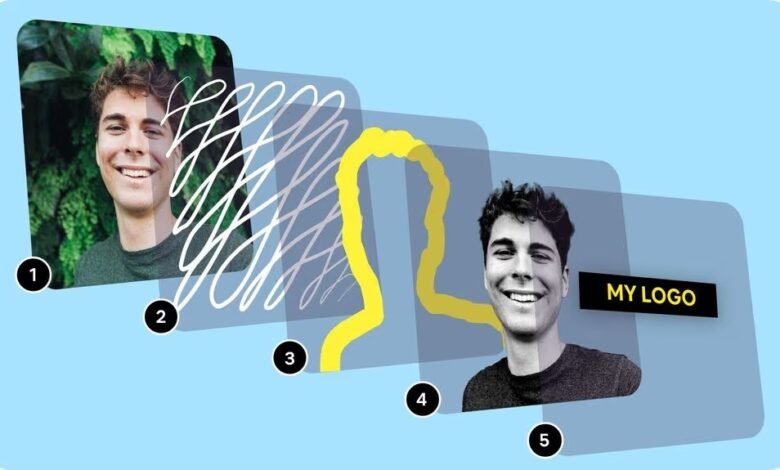
Your profile picture is often the very first detail people notice when they come across your social media page, professional profile, or online community account. It’s a tiny image, but it carries a surprising amount of influence. In today’s digital world, that small circle or square can tell others who you are, what you represent, and how you want to be seen. Instead of relying on old photos or plain selfies, many people now prefer creating customized, polished images that feel more personal and visually appealing. And thanks to modern digital tools, you can easily make your own profile picture with creativity, style, and professional finishing, without needing advanced design skills.
This article will guide you through the entire process, from choosing the right photo to using modern editing tools and designing a profile picture that perfectly reflects your personality and purpose.
Why Customize Your Profile Picture?
Even though it may seem simple, your profile picture speaks louder than words. Here’s why taking time to design a custom one matters:
1. It Creates a Strong First Impression
People form opinions within seconds. A well-designed profile picture helps you appear confident, authentic, and approachable from the very first glance.
2. It Reflects Your Personality
When you make your own profile picture, you decide the colors, mood, background, and style. It becomes a genuine expression of your identity rather than just a random image.
3. It Elevates Your Online Presence
Whether you’re on LinkedIn, Instagram, YouTube, or a gaming platform, a custom-made picture instantly gives your profile a polished, premium look.
4. It Helps With Personal Branding
Consistency is key. Using similar design styles across platforms helps people recognize you instantly and trust your identity online.
What You Need Before You Start Designing
Creating a modern and eye-catching profile picture doesn’t require expensive gear. Here’s all you need:
A Clear Base Photo
Start with a photo where your face is well-lit, visible, and natural.
A Modern Editing Tool
Tools like Canva, Fotor, PicsArt, Adobe Express, and online AI editors help you edit easily and professionally.
A Style or Visual Theme
Do you want a clean, aesthetic look? A bold, gamer-style design? A corporate-style headshot? Knowing your goal helps you design more effectively.
Creativity and Time
The tools do most of the work, but the final touches depend on your creativity.
Step-by-Step Guide: How to Make Your Own Profile Picture With Modern Tools
Let’s go through the steps to help you design a professional, stylish, and modern profile picture.
Step 1: Choose the Perfect Base Photo
Your base photo sets the foundation, so choose wisely. Make sure your picture has:
- Good lighting
- A clear face
- Natural expressions
- Clean or minimal backgrounds
- Balanced composition
If needed, take a new photo using natural light, preferably near a window or outdoors.
Step 2: Use Background Removal Tools
Modern design tools offer automatic background removal options. This helps you eliminate distractions and gives your photo a clean, studio-like look.
After removing the background, replace it with:
- Solid colors
- Gradients
- Textured patterns
- Minimal abstract designs
- Brand colors
A clean background ensures your face remains the focal point.
Step 3: Enhance Lighting and Skin Tone
Modern AI tools can fix your lighting within seconds. You can adjust:
- Brightness
- Exposure
- Contrast
- Warmth
- Sharpness
- Shadows
- Skin smoothness
Avoid over-editing, keep the enhancements subtle so the photo looks natural.
Step 4: Choose a Modern Style or Theme
This is your creative space. Modern design tools offer templates and presets for different styles. Select one based on your personality and purpose.
Modern Style Options
1. Minimalist Modern Style
- Clean white or grey background
- Soft shadows
- Light borders
2. Aesthetic Soft Style
- Pastel colors
- Light filters
- Gentle gradients
3. Gamer/Streamer Style
- High contrast
- Neon glows
- Vibrant backgrounds
4. Professional Corporate Style
- Neutral colors
- Subtle lighting
- Simple gradients
5. Digital Art or Cartoon Style
- AI-generated illustrations
- Cartoon filters
- Sketch outlines
Choosing the right style helps your profile picture match your online identity.
Step 5: Add Creative Elements
To make your photo stand out, consider adding modern design elements such as:
- Color rings
- Glow outlines
- Drop shadows
- Graphic icons
- Minimal shapes
- Frames or borders
- Blur effects
These small details can transform a simple picture into a stylish, eye-catching design.
Step 6: Adjust Composition and Balance
Ensure your face is centered and occupies a good portion of the frame. Profile pictures are often viewed in small sizes, so clarity is crucial.
Check:
- Position
- Crop size
- Headroom
- Face visibility
A well-balanced composition gives your picture a polished and professional feel.
Step 7: Export in High Resolution
When you’re done, export your picture in high quality. Square sizes (1080×1080) work best on almost all platforms.
Choose:
- PNG for sharp edges
- JPG for natural photos
A high-resolution export ensures your image looks crisp even as a small icon.
Modern Tools That Help You Make Your Own Profile Picture
Here are some user-friendly modern tools that make the design process smooth and enjoyable:
1. Canva
Great for beginners with tons of templates.
2. Adobe Express
Ideal for professional-level edits.
3. PicsArt
Perfect for creative designs and aesthetic edits.
4. Fotor
Simple background removal and enhancement features.
5. AI Profile Picture Generators
Quick, stylish, and automated options for fast results.
These tools allow anyone, regardless of skill level, to design a stunning profile picture effortlessly.
Best Practices for Creating a Modern Profile Picture
To ensure your picture looks clean, modern, and appealing, follow these tips:
Keep Your Background Simple
Avoid cluttered or distracting elements.
Use Colors That Match Your Personality
Choose themes that feel like “you.”
Make Sure Your Eyes Are Visible
Eye contact enhances connection and trust.
Keep Your Expressions Natural
Genuine smiles and relaxed poses look best.
Be Consistent Across Platforms
Using one style everywhere strengthens your personal brand.
Which Style Works Best for Each Platform?
Each platform has different expectations. Here’s what works well:
- Corporate style
- Neutral backgrounds
- No heavy filters
- Aesthetic
- Creative or pastel looks
- Trendy edits
- Friendly and casual
- Natural lighting
WhatsApp / Telegram
- Simple, clean portraits
- Soft colors
YouTube or Gaming Profiles
- Neon
- High contrast
- Strong outlines
Choosing the right style helps your personality shine authentically online.
Creative Ideas to Personalize Your Profile Picture
When you want something extra, try these ideas:
Color-coordinated themes
Match your clothes with the background.
Seasonal versions
Create profile pictures inspired by festivals or seasons.
Artistic versions
Turn your face into a digital painting, anime, or sketch.
Brand-based versions
Use your signature colors, logo, or initials.
These small tweaks make your profile picture engaging and memorable.
Why Modern Tools Make the Process So Easy
Years ago, creating a professional-looking profile picture required Photoshop skills or hiring experts. Today, modern design tools use AI and smart templates, allowing anyone to produce high-quality results in minutes.
Benefits include:
- Fast editing
- Automatic enhancements
- Easy customization
- Professional output
- Unlimited creative options
This makes it effortless for you to make your own profile picture that looks polished and unique.
Final Thoughts
Designing a modern, eye-catching profile picture doesn’t have to be complicated. With today’s easy-to-use tools, you can create a picture that reflects your personality, matches your style, and enhances your online presence, all without needing professional editing skills.Whether you want something professional, playful, artistic, or trendy, your ideal profile picture is just a few clicks away. So take the time to experiment, explore creative styles, and confidently make your own profile picture that truly represents you.